


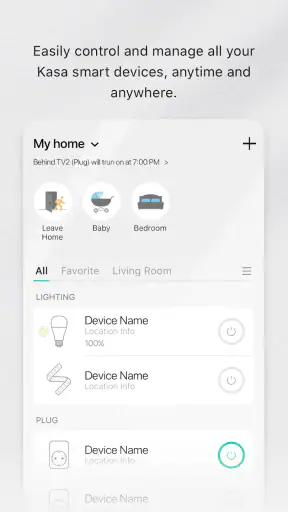
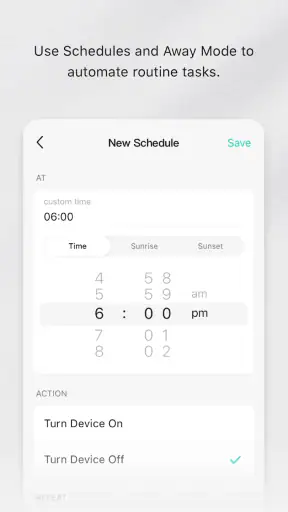
I found Kasa Smart most useful when I stopped thinking of it as a remote control and started treating it as a shared household dashboard. It is a lifestyle app from TP-LINK SYSTEMS INC. for managing compatible TP-Link smart-home products, and its real value appears when more than one person needs a practical way to interact with the same home equipment. I can check a device, change its state, and build a simple routine around everyday habits without walking from room to room each time.
That shared-home angle also exposes the app’s boundaries. It is not a general smart-home controller for every brand, and it does not replace careful decisions about who should have access to connected equipment. If your home already relies heavily on products from several manufacturers, a broader platform may fit better. If you use compatible TP-Link devices and want one focused place for them, however, this app is much easier to understand than a collection of disconnected product apps.
How Kasa Smart fits into a shared home
A realistic example is a household where one person leaves early, another works from home, and someone else arrives later. Instead of each person remembering a different physical switch or asking another family member to change something, the app gives the household a common point of interaction. One person can manage a connected light or plug before leaving, while another can check and adjust it later. That sounds simple, but reducing small handoffs is where a smart-home app earns its place.
I also like the fact that the app is not tied to one narrow type of device. Its purpose is to act as a portal to a TP-Link smart home, so the experience makes more sense as your compatible equipment grows. A single device can justify installing it, but the interface becomes more useful when several devices need to be viewed and controlled in the same context.
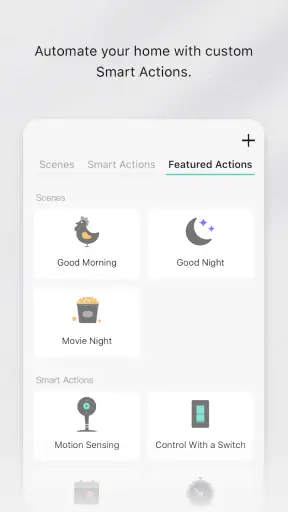
The important distinction is between convenience and automation. Kasa Smart can make a repeated action easier, but it does not magically solve household organization. Before adding a routine, I would first decide what the routine is meant to accomplish: turning something off when everyone leaves, preparing a room for the evening, or making a shared device easier to find. A clear purpose prevents the app from becoming another screen full of controls that nobody remembers to use.
For a shared device, I would choose a routine that is easy to understand and easy to override. A household should not have to guess why an appliance changed state or whether another person initiated the action. The less surprising the behavior, the more likely everyone will continue using the system rather than returning to manual controls.
Setup is straightforward, but boundaries matter
The first installation is not the point at which I would hand the phone to every person in the home. I would create the main setup carefully, name devices in plain language, and test each one before inviting anyone else to use the arrangement. Names such as “hall lamp” or “desk plug” are more useful than product-style labels, especially when a household contains several similar devices.
Device naming is a small detail with a big effect. When several people use the same app, vague names create avoidable mistakes. A label should describe both the location and the purpose when necessary. That makes the control screen more readable and reduces the chance of switching the wrong item when someone is in a hurry.
I would also separate the physical setup from the account decision. The person who connects the first device effectively becomes responsible for the structure of the household’s smart-home environment. That does not mean one person should control everything forever; it means the initial account arrangement deserves thought. A shared home benefits from a stable primary setup, while other users should only receive the access that makes sense for their role.
This is especially important with plugs or devices connected to equipment that should not be interrupted casually. A smart control can be convenient, but it should not encourage people to switch off something without understanding what it powers. I would test the result during a quiet moment, explain the intended use, and avoid putting sensitive equipment behind a control that everyone can activate impulsively.
The app is free, which makes trying it less complicated from a budget perspective. Its age rating is Everyone, but that should not be confused with unrestricted household access. A child may be able to understand the interface, yet the consequences of controlling a real device depend on what that device does. The responsible question is not only whether someone can use the screen, but whether they should be able to operate that particular device.
Coordination works best when the household agrees on a routine
In my experience, the strongest shared-use workflow begins outside the app. The household first agrees on a rule, then uses Kasa Smart to make that rule convenient. For example, everyone might agree that a certain light is normally turned off after the last person leaves. The app can support that habit, but the agreement prevents confusion when someone is still using the room.
This is also where routines need restraint. Automating every possible action can create conflicts between people’s schedules. A light that changes at a convenient time for one person may be inconvenient for another. I would begin with one or two predictable actions and observe how they fit real life before adding more. If a routine causes repeated surprises, it is not saving effort, even if it looks clever on paper.
Shared use raises a practical question: can everyone see and control the same devices? The answer depends on how the household organizes its account and compatible equipment, so I would not assume that installing the app on another phone automatically creates the right access arrangement. I would check the sharing and account options during setup and decide who needs control, who only needs awareness, and who should not be included.
That boundary is useful in a home with guests, roommates, older relatives, or children. Giving every person identical control may be convenient at first, but it can also remove accountability. A better arrangement is one where the main user understands the system, other trusted adults can participate, and temporary users are not given more access than they need.
I would keep a simple household explanation next to the physical device or in a shared note: what the device controls, what its normal state is, and when a manual change is expected. This is not a feature claim about the app; it is a practical habit that makes any connected home more dependable. The app handles the control, while the household handles the meaning.
Age, trust, and the difference between access and responsibility
The Everyone rating makes Kasa Smart approachable for a broad audience, and the basic idea is easy enough for many people to grasp. Still, age alone should not decide access. A young user might be perfectly capable of turning a lamp on, but that does not mean the same user should control a plug connected to equipment that must remain powered or be shut down carefully.
I would introduce children to the app, if appropriate, through low-consequence devices and clear rules. The goal would be to teach what each control does rather than treating the system as a toy. For older family members, the most helpful preparation may be simpler: clear device names, a short explanation of the normal state, and a test run that confirms the app is connected to the expected equipment.
Trust matters just as much among adults. A shared account can be convenient, but it can also blur who changed something and why. Separate personal habits may be preferable where the household needs clearer boundaries, while a single organized setup may be easier for a couple or small family managing the same rooms. I would choose the arrangement that balances convenience with accountability instead of assuming there is one perfect model.
Privacy is another reason to keep expectations realistic. Kasa Smart is centered on TP-Link smart-home equipment, not on being a family communication platform. It can help people coordinate device use, but it should not be treated as a substitute for telling others about an unusual schedule or an important change at home. A connected switch cannot understand every human exception.
What the app does well compared with usual alternatives
The usual alternative is to use each device’s individual app, or to control everything manually. A separate app for every product may work when a home has only one device, but it becomes tiring when people need to remember different interfaces and account arrangements. Kasa Smart’s advantage is focus: it gives TP-Link users a central place to work with their compatible smart-home equipment.
A broader smart-home ecosystem may be a better choice for someone who wants one control layer across many brands, voice assistants, sensors, and advanced automations. That wider approach can be more flexible, but it may also introduce more setup decisions and more opportunities for compatibility problems. Kasa Smart is appealing precisely because it does not try to be every platform at once.
Manual control remains better in certain situations. If a device is rarely used, if everyone in the home can reach its physical switch, or if the household does not want account-based access, installing the app may add more maintenance than value. I would not recommend building a smart-home workflow simply because the option exists.
The app’s strong public reception suggests that many people find the basic experience approachable: it has a 4.7 average from around 143 thousand ratings, and it has passed 5 million installs. Those figures do not remove the need to check compatibility or think about access, but they do make it feel like an established choice rather than an experimental utility.
Practical details I would check before committing
Kasa Smart is available free of charge, and the current Android release is version 3.4.602. It requires Android 7.0 or newer, so older phones may need attention before installation. I would check the phone used by the main household account, not only the newest phone in the family, because shared use often involves an older spare device.
The app has been available since November 7, 2015, and TP-LINK SYSTEMS INC. continues to identify it as the home portal for its smart products. That long presence is reassuring for someone who wants a focused companion rather than a short-lived experiment, although I would still approach every connected-home purchase with a plan for how the household will use it over time.
Before buying additional equipment, I would confirm that it belongs to the TP-Link range supported by the app and that its intended use suits the household. Compatibility is not merely a technical checkbox. A device can work correctly and still be a poor fit if its controls are too easy to trigger, its location is ambiguous, or its routine conflicts with another person’s schedule.
I would also test the app from the places where it will actually be used. A control that works perfectly during setup may be less convenient when someone is carrying groceries, helping a child, or arriving home late. That test often reveals whether the app is genuinely reducing effort or simply moving the same task onto a phone.
Who should use it, and who should look elsewhere
I would recommend Kasa Smart to households already using compatible TP-Link devices, especially when several people need a shared way to check and change them. It is also a sensible starting point for someone who wants a focused smart-home app without immediately committing to a large multi-brand platform.
I would be more cautious if your home mixes many brands and you want one universal dashboard. In that case, a broader ecosystem may reduce the number of apps you maintain. I would also skip it if you dislike account-based control, rarely use connected devices, or prefer every household member to rely on physical switches.
It is not the right answer to every family coordination problem. The app can make device control more accessible, but it cannot decide who should have access, explain an unexpected change, or replace a household agreement. Those responsibilities remain with the people using the home.
My household verdict
After looking at it as a shared-home tool rather than a novelty remote, I see Kasa Smart as a practical, focused choice for TP-Link users. Its best quality is not a flashy trick; it is the reduction of small points of friction between people who share rooms, schedules, and equipment. Clear naming, careful account boundaries, and modest routines make a bigger difference than trying to automate everything.
The trade-off is equally clear. You are choosing an app built around TP-Link’s smart-home environment, so it makes the most sense when your devices already belong there. People seeking a universal controller or a highly elaborate automation system may be happier elsewhere. For a household that wants a free, approachable way to coordinate compatible devices, though, the smartest setup is the one everyone understands and can use without surprises.
My recommendation is to begin with one shared device, one clearly named control, and one agreed household rule. Let everyone test that arrangement before expanding it. If the app genuinely saves time and avoids repeated questions, add another device. If it creates confusion, simplify the setup rather than blaming the technology. That measured approach brings out what Kasa Smart does well while keeping its limitations visible.


